The Accidental Brutalist Beauty of Penknife (An Editor)
If you didn't know, I have been trying to develop my own text editor during whatever time I could spare in the last few months. I named it Penknife for the time being, and the code can be found here. Currently, Penknife is able to open and save text files, which is barely anything worth talking about, but when I was thinking about its UI I believe I've come across something very interesting.
A quite unconventional user interface
Acme is a text editor for Plan 9. Comparing with Emacs and Vim (and any other text editors out there) it has a fairly strange control scheme. I will not explain the details of how one navigates acme here; I'm only going to list my opinions on it:
The good
- The fact that one can easily dump and restore the state of the whole editor into a text file.
- If I remembered correctly, VSCode (and many IDEs) has the option of saving one's "workspace" into a file, but in my opinion this is too clumsy compared to acme, and I haven't seen anybody actually using that feture.
- The fact that everything, including the menu bar / title bar looking things, are all texts that you can edit (which is a thing stolen from Project Oberon)
- The fact that due to how acme integrate things any valid shell command is at the same time a valid "acme command" (which makes certain extensions possible in a language-agnostic manner!)
The bad
- The fact that you have to use the mouse for certain actions.
- And the fact that you need a three-button mouse.
- Most, if not all modern mice have at least three buttons, but the middle button is ubiquitously a wheel, which makes it not very pleasant to click, especially when it's the button you need to click to execute command within the editor, which is an action you'll be doing a lot.
- Certain actions requires you to press multiple mouse buttons at the same time as well, which is even more annoying.
- (The way commands are invoked (imagine
M-xin Emacs) is one would select the text of the command with the mouse and press the middle button. Of course you can just directly point to any command and press the middle button, in which case acme would read the word under the mouse pointer and execute that accordingly)
- And the fact that you need a three-button mouse.
- The fact that there's no syntax highlighting.
- Rob Pike hated it, and I think hating on syntax highlighting is stupid. I have much more strong words to say about this, but my mom said according to traditional Chinese fortune telling I have a high risk of getting into trouble by running my mouth this year, so that's all I'm gonna say here.
- …And the fact that the only way one can configure this thing is to learn enough about the codebase itself and implement the features you want on your own, and you have to do a lot of work to turn it into something bearable in today's standards.
- If I had to become an editor developer no matter what, I might as well make my own editor instead of improving someone else's.
The plan
So I started thinking that I should:
- Move many of the mouse's functionalities (especially the command execution part) to keyboard;
- Add syntax highlighting;
- Add a scripting language so that one doesn't have to go through my code to configure and extend the editor.
- Adopt acme's way of integrating tools.
All of this is accidental; I was originally going to make something akin to micro and I would've never thought about this if I had not go back and read through acme's man page. I currently don't plan to implement split window for Penknife, but if I would I'm definitely going to add windmove (from Emacs).
The current state of things
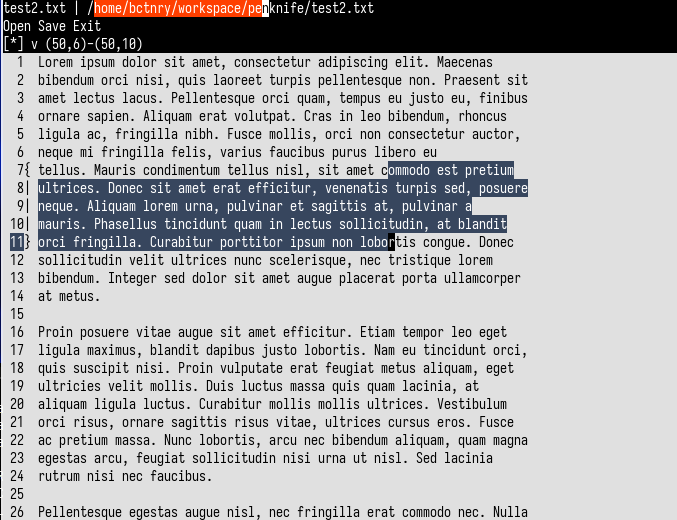
Figure 1: A screenshot of Penknife, as of 2025.3.18
From top to bottom there are three different UI components:
- The "auxiliary buffer", which currently contains:
- The name of the current text buffer (
test2.txt) and its full path in the file system; - A few (but not all) available actions.
- The name of the current text buffer (
- The "status line", which shows:
- The "dirty flag" of the current buffer. (A star
*would be displayed if the buffer is modified but not saved to file.) - The current focus; a circumflex
^would be displayed if the current focus is at the auxiliary buffer, the lettervwould be displayed if the current focus is at the main buffer instead. - The current location of cursor (if there is no active selection range in the main buffer) or the range of currently active selection.
- The "dirty flag" of the current buffer. (A star
- The "main buffer", which contains a panel for showing line numbers and the current selection range and the content of the file we're editing itself.
Much like acme, the "auxiliary buffer" is not a title bar and/or menu bar but another textfield whose content can be edited just like the one below for the file itself. Different actions are carried out by selecting texts and executing them as commands (by pressing Alt-x), and opening and saving files are done by changing the path in the first line and executing the Open and the Save command respectively, just like using Get and Put in acme. Executing a number jumps to the corresponding line; forward & backward search & replace would work in the same manner as well in the future. The commands doesn't have to be in the auxiliary buffer; one can do the same in the main buffer as well. I thought about removing the status line and thus making the whole UI only two text fields (!), but it's too useful to not have one.
I don't think this is ever going to be the "fastest" way to edit text but I think there's potential for a cult following…
Last update: 2025.3.19